
Sage 100 security requires more than reviewing users inside the software. Depending on how Sage 100 is deployed, security may also involve your Windows server, workstations, remote access tools, hosting provider, backups, SQL Server, third-party integrations, and internal IT policies.
This page is designed to help Sage 100 customers understand the key areas they should review to help protect their system, data, and users.
The goal is not to turn your accounting team into network engineers. That would be rude. The goal is to help identify the right security questions and make sure the right people are reviewing them.
If Sage 100 is installed on your own server, your internal IT team or managed service provider should help review:
ACC can help review Sage 100 application security, but the server and network environment should also be reviewed by your IT provider.
If Sage 100 is hosted by a third-party provider, many server-level protections may be handled by the hosting company. However, your company should still validate what is being managed and what remains your responsibility.
Questions to ask your hosting provider include:
Hosted does not mean “nothing to review.” It means the review includes the hosting provider, because apparently responsibility likes to hide in contracts.
Review Sage 100 Users and Roles
Sage 100 allows companies to create security roles that control access to companies, modules, menus, tasks, and system permissions. A security review should confirm that user access still aligns with actual job responsibilities and that employees only have access required for their day-to-day work.
Organizations should also review access to sensitive modules, company maintenance settings, and security configuration areas. Users with multiple overlapping roles or excessive permissions may introduce unnecessary risk if access has expanded over time without review.
Limit Administrator Access
Administrator access should be restricted to a small number of trusted users and reviewed regularly. Companies should confirm that administrative rights are still necessary, remove outdated access for former employees or consultants, and avoid using shared administrator accounts whenever possible.
Administrative privileges should not be used for routine processing tasks unless absolutely required. Limiting elevated access helps reduce both accidental changes and security exposure.
Validate Backups and Disaster Recovery
Backups are a critical part of ERP security and business continuity planning. If data is damaged, encrypted, deleted, or lost, the recovery process becomes just as important as preventing the issue in the first place.
Companies should confirm that Sage 100 data, custom reports, integration folders, and related repositories are included in backup planning where appropriate. Backup files should be stored separately from the production environment, and restore testing should be performed periodically to confirm recovery procedures actually work when needed.
Review Third-Party Integrations
Many Sage 100 environments include third-party applications for EDI, shipping, reporting, warehouse management, payment processing, and other operational functions. These integrations should be reviewed regularly to confirm they are still required, properly secured, and included in upgrade and backup planning.
Organizations should also review how integrations connect to Sage 100, what level of access they require, and whether dedicated accounts are being used instead of standard employee credentials. Unused integrations or outdated access points should be removed when no longer needed.
Secure Remote Access
Many Sage 100 environments rely on Remote Desktop Services, Citrix, or hosted desktop environments for remote access. Because these systems often serve as the primary entry point into the ERP environment, they should be reviewed carefully as part of an overall security strategy.
Areas commonly reviewed include multi-factor authentication, remote desktop permissions, idle session timeout policies, consultant access, and controls around file transfers or shared clipboard access. Companies should also confirm that former employees no longer retain remote login access.
Sage documentation also includes environment-specific considerations for Remote Desktop Services and Citrix deployments, including workstation and server configuration recommendations.
Stay Current and Supported
Running unsupported software can increase both security and operational risk. Companies should periodically review their Sage 100 version, Windows Server compatibility, workstation requirements, and third-party enhancement compatibility to confirm their environment remains supported.
Upgrade planning is especially important for organizations preparing for Sage 100 2026, which is a 64-bit only release and may require additional planning for environments still running older 32-bit components. Reviewing upgrade readiness early can help reduce disruption and avoid compatibility surprises later in the process.
Use this as a starting point:
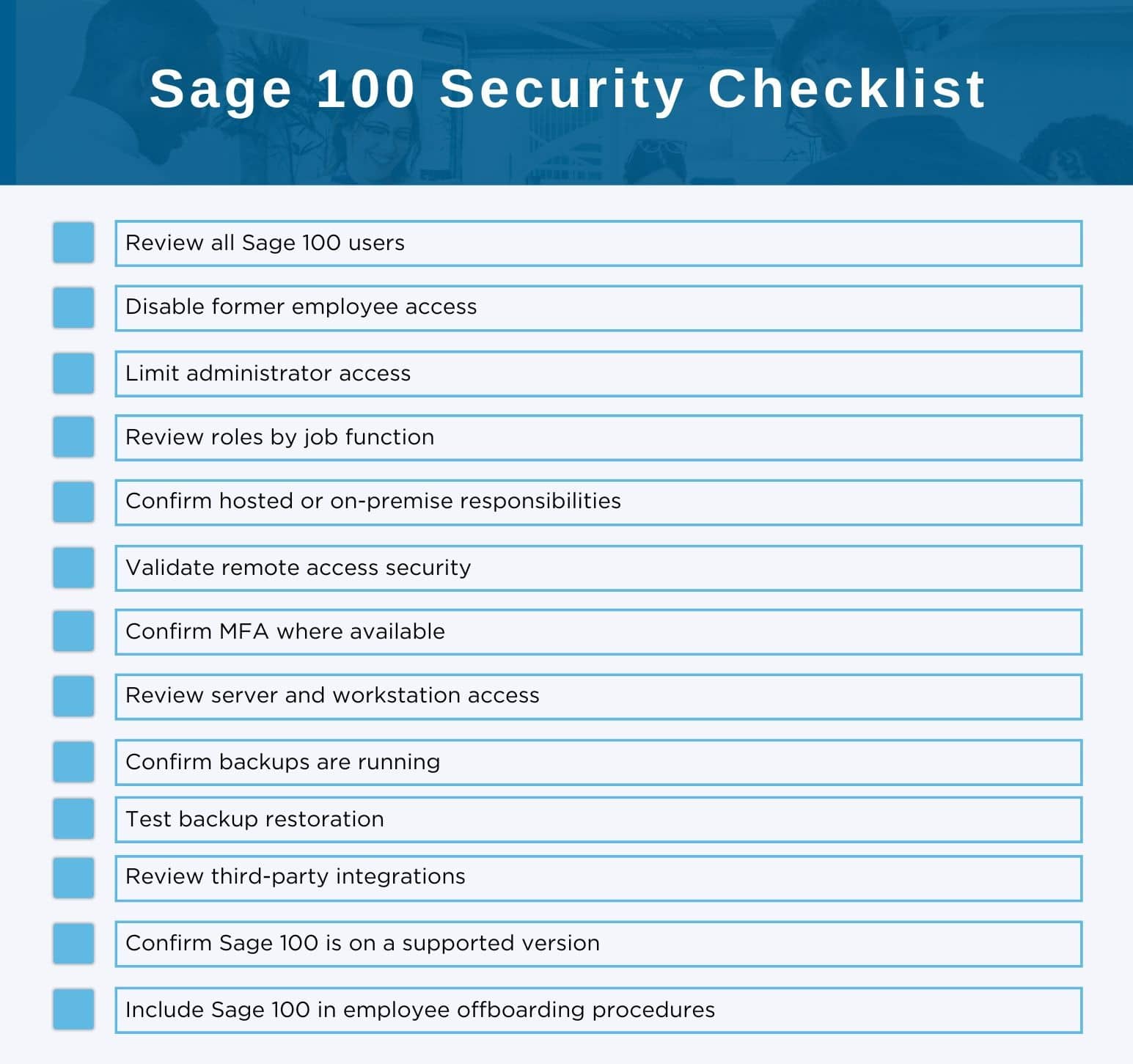
ACC Software Solutions can help Sage 100 customers review application-level security and identify areas that should be discussed with internal IT or a hosting provider.
ACC can assist with:
ACC Software Solutions can help your team review Sage 100 user access, roles, administrator permissions, hosted environment questions, remote access concerns, and other security best practices.
Contact ACC Support
Email: support@4acc.com
Website: www.4acc.com/support
Solutions by Industry
What's New

Where Does Your Team Lose Time Without Realizing It?
Read MoreSubmitted by Courtney Quinn on Fri, 10/09/26 - 11:33
What Should Be Part of Your 2027 Technology Plan?
Read MoreSubmitted by Courtney Quinn on Fri, 09/25/26 - 10:39
What Today’s Distributors Are Being Asked to Manage
Read MoreSubmitted by Courtney Quinn on Thu, 09/17/26 - 13:38
Whatever Your ERP Needs, We Have the Solution!
Or call us for a free consultation 866-379-3799