
Acumatica includes security tools designed to help protect your company’s financial, customer, vendor, inventory, and operational data. However, these tools are most effective when they are reviewed and maintained as part of your normal business process.
This page highlights practical security areas Acumatica customers should review, including password settings, multi-factor authentication, user roles, consultant access, integrations, and recurring security reviews.
The goal is not to make your team security experts. The goal is to help you identify common areas that may need attention before they become a problem, because apparently waiting until something breaks is still the most popular business strategy.
Password Settings
Strong password policies are one of the simplest ways to improve ERP security. Acumatica customers should regularly review company-wide password settings to confirm they align with current security expectations. This includes evaluating password length requirements, complexity rules, expiration timing, password history policies, account lockout settings, and password reset procedures.
A practical starting point is requiring longer passwords, preventing repeated reuse of old credentials, and temporarily locking accounts after multiple failed login attempts.
Multi-Factor Authentication
Multi-factor authentication (MFA) adds another layer of protection beyond a password and is one of the most effective ways to reduce the risk of unauthorized access. MFA should be strongly considered for all users, especially administrators, finance teams, remote employees, consultants, and users with access to sensitive business information.
User Roles and Permissions
Acumatica uses role-based security, meaning users should only receive access necessary for their specific responsibilities. Whether someone works in accounting, sales, warehouse operations, leadership, or system administration, their permissions should reflect the tasks they actually perform.
This approach follows the principle of least privilege, which simply means users should not have broader access than required. Limiting unnecessary permissions helps reduce accidental changes, data exposure, and overall security risk.
Administrator Access
Administrator access should be limited to a small group of trusted users and reviewed regularly. Companies should periodically confirm who currently has elevated rights, whether MFA is enabled for administrator accounts, and whether that level of access is still necessary.
It is also important to avoid shared administrator accounts and remove access promptly for former employees, consultants, or temporary project users. Administrative privileges should not be used for routine day-to-day work unless absolutely required.
Consultant and Partner Access
Outside consultants and implementation partners may require temporary access to Acumatica for support, upgrades, or project work. That access should be controlled carefully and reviewed on a regular basis.
Organizations should use named accounts instead of shared logins, assign only the permissions required for the project, and disable temporary access once work is complete. Consultant accounts should also be reviewed during project closeout to confirm unused access has been removed.
Integration and Service Accounts
Integrations should use dedicated service accounts rather than standard employee credentials. This commonly applies to eCommerce platforms, EDI systems, shipping software, reporting tools, warehouse applications, and API connections.
Using dedicated service accounts improves visibility into connected systems, simplifies troubleshooting, and helps avoid disruptions if an employee leaves the company or changes roles.
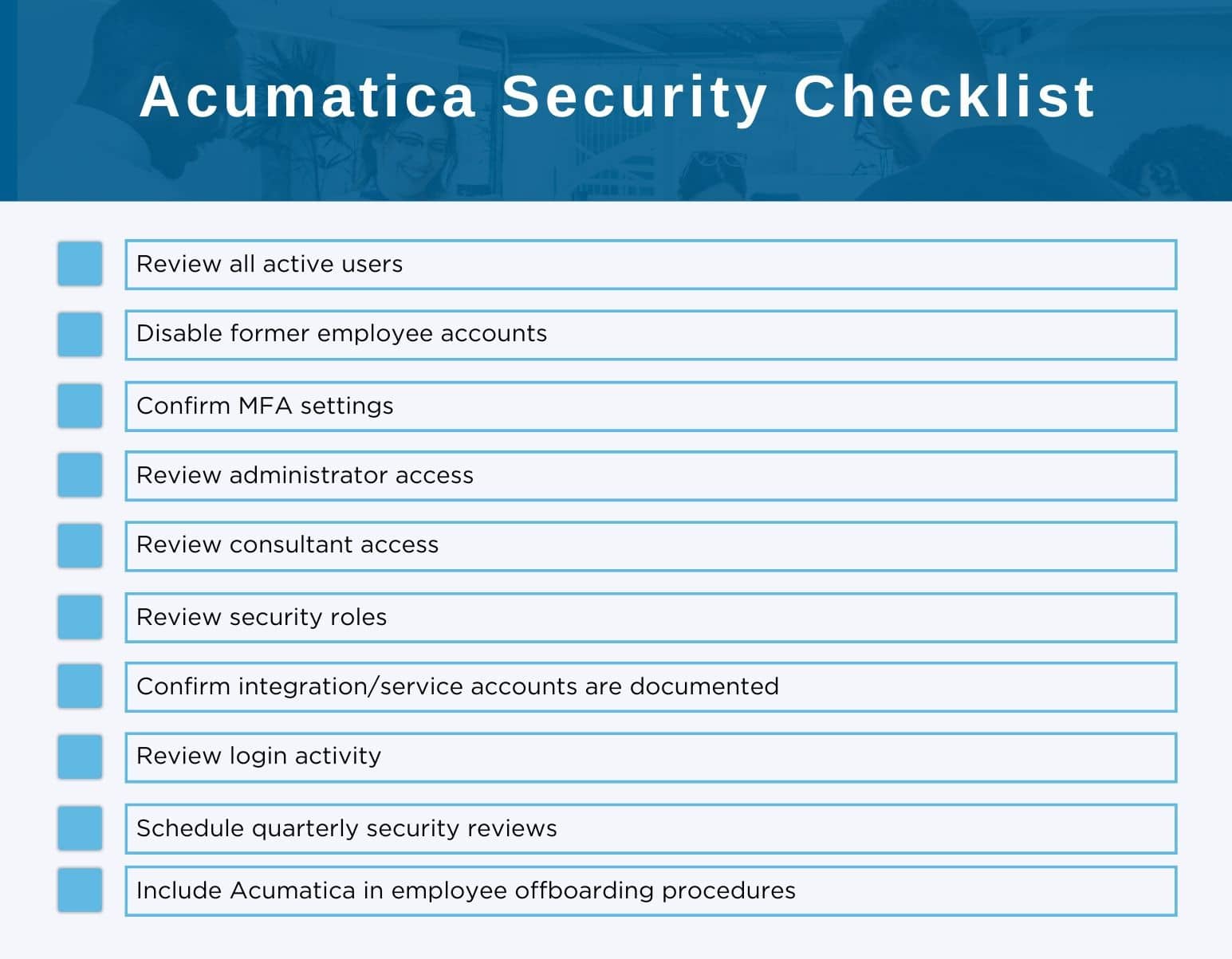
Security should be reviewed regularly rather than only after a problem occurs. A recurring quarterly review can help organizations keep user access accurate, current, and aligned with operational needs.
These reviews typically include checking active and inactive users, reviewing administrator and consultant access, validating MFA settings, reviewing security roles, and confirming integration accounts are still necessary. Monitoring login activity and removing outdated accounts can also help reduce unnecessary risk.
The process does not need to be overly complicated. Even a simple recurring review schedule can help identify issues early before they become larger security or operational problems.
Use this as a starting point:
ACC Software Solutions can help Acumatica customers review their current security setup and identify areas that may need attention.
ACC can assist with:
Our focus is to help customers improve security in a practical way without making the system harder to use.
ACC Software Solutions can help your team review user access, MFA options, security roles, consultant accounts, integration users, and other Acumatica security best practices.
Contact ACC Support
Email: support@4acc.com
Website: www.4acc.com/support
Solutions by Industry
What's New

Where Does Your Team Lose Time Without Realizing It?
Read MoreSubmitted by Courtney Quinn on Fri, 10/09/26 - 11:33
What Should Be Part of Your 2027 Technology Plan?
Read MoreSubmitted by Courtney Quinn on Fri, 09/25/26 - 10:39
What Today’s Distributors Are Being Asked to Manage
Read MoreSubmitted by Courtney Quinn on Thu, 09/17/26 - 13:38
Whatever Your ERP Needs, We Have the Solution!
Or call us for a free consultation 866-379-3799