
Your ERP system is one of the most important applications in your business. It may contain sensitive financial information, customer records, vendor data, employee-related records, pricing, inventory details, and operational history.
A strong security strategy helps reduce risks related to unauthorized access, weak user permissions, unmanaged devices, poor password practices, insecure third-party integrations, and limited visibility into system activity. It also helps protect against business disruption caused by ransomware, data loss, or system failure while supporting compliance and reporting requirements.
Security does not have to make your system difficult to use. A well-designed approach gives employees the access they need while helping protect sensitive areas they should not access. After all, users can do their jobs effectively without having unrestricted access to the entire system.
Review user permissions, administrator access, approval workflows, and role-based security settings to reduce unnecessary exposure to sensitive ERP data.
Access control determines what users can see and do inside the ERP system. Over time, permissions often expand beyond what is actually needed as roles change and employees move between departments.
A strong setup ensures users only access the data required for their job while keeping sensitive financial and operational areas restricted. Approval workflows and administrative rights should be intentionally limited and reviewed regularly to prevent unnecessary risk.
Confirm former employees are removed, enforce MFA requirements, strengthen password policies, and review login security settings regularly.
User security protects how people access the system. The biggest risk is outdated or inactive accounts that remain enabled after role changes or employee departures.
Multi-factor authentication, strong password policies, and regular review of active users help reduce unauthorized access. Security is strongest when login controls are consistently maintained, not just initially configured.
Review API access, third-party applications, EDI connections, and integration users to ensure connected systems are properly secured.
Integrations connect the ERP to external systems like eCommerce, shipping, and CRM tools. While they improve efficiency, they also extend access beyond the core system.
Each integration should have a clear purpose, defined ownership, and limited permissions. Regular review helps ensure unused or over-permissioned connections do not create hidden security gaps.
Verify backup responsibilities, recovery procedures, restoration timelines, and business continuity planning to reduce downtime risk.
Backup and recovery ensures the business can continue operating after unexpected system failures, outages, or data issues.
The key is not just having backups, but knowing how quickly they can be restored and whether they have been tested. Clear ownership and documented recovery steps are essential for minimizing downtime and data loss.
ERP user access should always reflect current job responsibilities, not historical roles or temporary exceptions. Over time, access tends to accumulate as employees move between departments or take on additional tasks, which can lead to unnecessary exposure of sensitive data.
This section should be reviewed regularly to confirm that each user only has access to the functions, screens, and data required for their role. Special attention should be given to financial records, customer and vendor data, and any administrative tools that control system behavior.
A strong access structure also includes clear separation of duties, ensuring no single user has excessive control over critical processes such as creating, approving, and posting transactions.
Login security is one of the most effective ways to prevent unauthorized access to ERP systems. Passwords alone are no longer sufficient protection, especially in environments where users access systems remotely or across multiple devices.
Multi-factor authentication (MFA) adds an additional verification step during login, reducing the risk of compromised credentials being used to access the system. This is especially important for administrator accounts and users with access to sensitive financial or operational data.
Login policies should also be reviewed regularly to ensure password standards, session timeouts, and account lockout rules align with current security expectations.
ERP systems contain a wide range of sensitive business data, including financial information, customer records, pricing structures, payroll details, and operational history.
The primary risk is not just access to this data, but how it is used and exported. Reports downloaded to Excel, data shared externally, or attachments stored within the system can all create exposure points if not properly controlled.
Security in this area relies on a combination of role-based access, field-level restrictions, and awareness of how data is being handled outside the system.
Audit trails provide visibility into what actions were taken in the system, who performed them, and when they occurred. This includes changes to records, financial transactions, user permissions, and system configurations.
While most ERP systems track this information automatically, its value comes from regular review and interpretation. Without active monitoring, audit logs become passive data rather than a meaningful control mechanism.
Audit activity is especially important for financial oversight, compliance requirements, and troubleshooting unexpected system behavior.
ERP security is not owned by one group. It is shared between the software provider, implementation partner, IT team, and the customer.
Software vendors provide the tools such as authentication, permissions, system updates, and platform security features.
IT teams or hosting providers manage infrastructure, network security, device access, and system availability.
Customers are responsible for how the system is used day-to-day: user access, internal policies, approvals, and ongoing reviews.
Most security gaps happen in the middle, where responsibility is assumed but not clearly owned.
ACC Software Solutions works with customers to make ERP security practical and manageable, not overwhelming. This typically includes reviewing how the system is actually being used, not just how it was originally configured.
Support areas include:
The focus is always on improving security without disrupting how the business operates.
A practical ERP security review doesn’t need to be complicated. It just needs to be consistent.
Use the checklist below as a starting point for a periodic review.
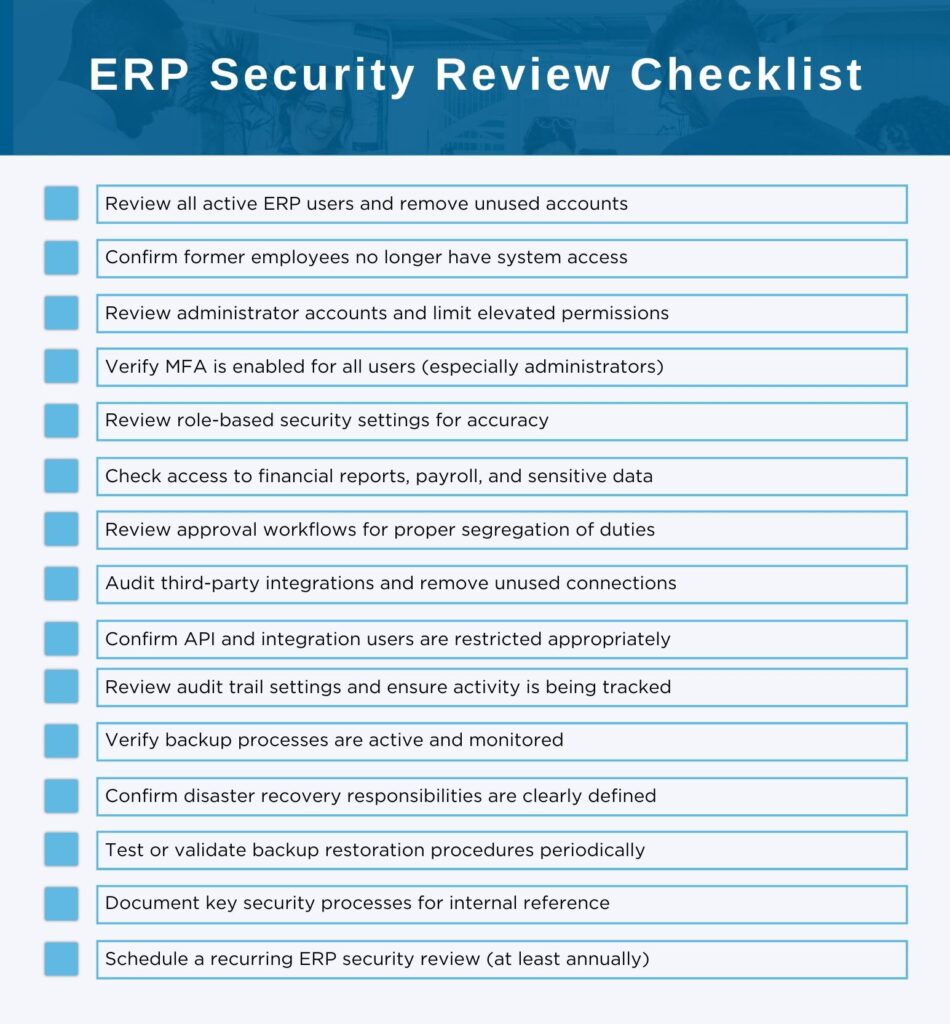
ACC Software Solutions can help your team review access, permissions, authentication, integrations, and backup processes to strengthen overall ERP security.
Contact ACC Software Solutions | Explore Our ERP Services
Solutions by Industry
What's New
Where Does Your Team Lose Time Without Realizing It?
Read MoreSubmitted by Courtney Quinn on Fri, 10/09/26 - 11:33
What Should Be Part of Your 2027 Technology Plan?
Read MoreSubmitted by Courtney Quinn on Fri, 09/25/26 - 10:39
What Today’s Distributors Are Being Asked to Manage
Read MoreSubmitted by Courtney Quinn on Thu, 09/17/26 - 13:38
Whatever Your ERP Needs, We Have the Solution!
Or call us for a free consultation 866-379-3799