
When production plans don’t reflect what’s actually happening on the shop floor, even a well-organized schedule can fall apart. Here’s how manufacturers can build more reliable schedules and keep production moving.
A production schedule might look great on Monday morning. Every job has an assigned start date, machines are scheduled, and customer orders appear to be on track.
Then reality sets in.
A machine goes down unexpectedly. Materials arrive later than expected. One production order takes longer than planned, pushing everything behind it.
By Wednesday, the original schedule is no longer accurate, and your team is spending valuable time figuring out what needs to change.
For many manufacturers, the challenge isn’t creating a production schedule. It’s creating one that can keep up with what’s actually happening on the shop floor.
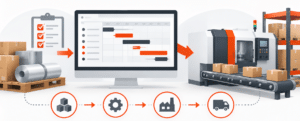
Production planning depends on accurate information. If scheduling decisions are based on outdated inventory counts, estimated production times, or incomplete capacity information, problems can develop before work even begins.
Consider a manufacturer that schedules several jobs through the same work center. On paper, the available hours appear sufficient. But one job requires additional setup time, another is waiting on materials, and a third has already fallen behind.
Without an accurate picture of production capacity and progress, the team may not recognize these conflicts until they affect customer orders.
The result is often last-minute schedule changes, unexpected overtime, and delivery dates that become increasingly difficult to meet.
A production schedule is only as reliable as the information behind it.
Manufacturers need to know how long operations actually take, which materials have been consumed, and how much work has been completed.
When production information is recorded manually or entered into the system hours later, planners may be working with an outdated picture of the operation.
Capturing information directly from the shop floor helps close that gap.
For example, when employees can record completed quantities, material usage, and production activity as work happens, managers have better information for evaluating job progress and adjusting plans.
This also helps improve inventory accuracy and production costing, two areas that can be affected when actual shop floor activity doesn’t match what’s recorded in the system.
Another common scheduling challenge is assuming that every work center has unlimited availability.
In reality, manufacturers operate within constraints. Equipment has a limited number of available hours, employees work specific shifts, and certain operations must be completed before others can begin.
That’s where Advanced Planning and Scheduling (APS) can make a difference.
APS helps manufacturers plan production around available capacity rather than relying entirely on estimated completion dates.
Acumatica Manufacturing Edition includes advanced planning and scheduling capabilities that help production managers understand capacity constraints and develop more realistic schedules.
With the release of Acumatica 2026 R2, the platform introduced additional manufacturing scheduling enhancements, including:
These enhancements can help manufacturers build schedules that better reflect how their facilities operate.
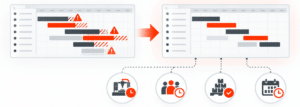
Even the best scheduling tools depend on accurate production information.
Acumatica 2026 R2 also expands the capabilities of its Shop Floor Kiosk, giving production employees additional ways to record activity directly from the floor.
The enhancements include more flexible material issuing, material substitutions, and improvements to production reporting.
For manufacturers, this creates an opportunity to improve the connection between planned work and completed work.
When shop floor information is captured accurately, production managers can make better decisions about what needs attention, which jobs may be falling behind, and where adjustments might be necessary.
Rather than discovering a scheduling problem after a delivery date has already been missed, teams can identify potential issues earlier.
If your production team regularly has to rebuild schedules, track job progress through spreadsheets, or call the shop floor to find out whether an order is on time, it may be worth reviewing how your current systems support production planning.
Start by asking a few practical questions:
These questions can help identify where better processes or more connected systems could make a difference.
Manufacturing schedules will always need adjustments. Unexpected delays and changing customer demands are part of the business.
The goal is to make those adjustments with accurate information and a clear understanding of available capacity.
With capabilities such as Advanced Planning and Scheduling and Shop Floor Kiosk, Acumatica Manufacturing Edition provides tools designed to help manufacturers better coordinate production planning with daily shop floor operations.
At ACC Software Solutions, we’re an Acumatica Gold Partner with over 30 years of ERP consulting experience. We work with businesses to evaluate their current processes and determine which solutions make sense for their operations.
Looking to improve how your business manages production planning?
Contact ACC Software Solutions to schedule a conversation about your manufacturing processes and how Acumatica may be able to help.
Solutions by Industry
What's New

Your Production Schedule Looks Good. Can Your Shop Floor Keep Up?
Read MoreSubmitted by Courtney Quinn on Thu, 10/29/26 - 16:32

Acumatica 2026 R2 Is Here: What’s New and Why It Matters
Read MoreSubmitted by Courtney Quinn on Fri, 10/23/26 - 16:22

Still Using QuickBooks? Here’s What Acumatica Can Do Differently
Read MoreSubmitted by Courtney Quinn on Mon, 10/19/26 - 13:27
Whatever Your ERP Needs, We Have the Solution!
Or call us for a free consultation 866-379-3799