
Spreadsheets are one of the most useful tools in business. They are flexible, familiar, and easy to start using.
The problem is that they are also easy to outgrow.
A spreadsheet that begins as a simple way to track inventory, orders, or monthly numbers can gradually become a critical part of the business. More employees need access. More information gets added. Different versions start circulating. Someone has to update the same information in multiple places.
Eventually, the spreadsheet is no longer making the process easier. It is creating more work.
For growing businesses, these five processes are often among the first places where that becomes apparent.
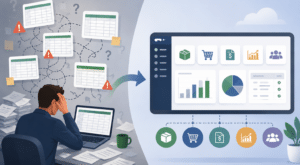
Inventory can become difficult to manage in spreadsheets surprisingly quickly.
A basic spreadsheet may work when you have a limited number of products and locations. As the business grows, however, you may need to track inventory across warehouses, monitor availability, account for incoming orders, manage reorder points, and understand what has already been committed to customers.
Keeping all of that information current manually becomes increasingly difficult.
It also creates a larger problem: the person looking at the spreadsheet has to trust that it reflects what is actually happening right now.
An ERP system connects inventory activity with purchasing, sales, and other areas of the business. Instead of relying on periodic spreadsheet updates, teams can work from information that changes as transactions occur.
Spreadsheets are deeply embedded in financial reporting, and they still have an important role to play. The issue arises when producing basic business reports requires repeatedly exporting, combining, cleaning, and reformatting data.
Finance teams may spend hours each month assembling reports from different systems before they can begin analyzing the numbers.
That process also makes reporting dependent on individual files and the people who know how to maintain them.
ERP software brings financial and operational information together in one system. Reports can be built using the underlying business data rather than recreating them from multiple exports every reporting period.
The result is less time spent preparing information and more time available to actually use it.
An order spreadsheet can seem perfectly manageable until order volume increases.
Then the questions start multiplying.
Has this order been processed? Is the product available? Has it shipped? Did purchasing already order what we need? Has accounting received the correct information?
When sales, warehouse, purchasing, and accounting teams maintain separate records, answering those questions may require emails, messages, phone calls, and several different spreadsheets.
ERP connects those steps so an order can move through the business without each department maintaining its own version of what is happening.
That becomes especially important as order volume grows and more employees become involved in fulfillment.
Purchasing decisions depend on information from several areas of the business.
What is currently in stock? What has already been ordered? What demand is expected? Which purchase orders are still open? What are we buying from each vendor?
When purchasing information lives in spreadsheets, employees often have to gather those answers manually before making a decision.
That can make it harder to know when to purchase inventory and how much is actually needed.
With purchasing connected to inventory, sales, and financial information through an ERP system, buyers can make decisions using a more complete view of current business activity.
Forecasting is one area where spreadsheets can become especially complicated.
Businesses may have separate files for sales forecasts, budgets, inventory plans, cash flow projections, or departmental planning. Each spreadsheet may rely on information pulled from somewhere else, and a change to one assumption can require updates across several files.
The bigger the business becomes, the harder it is to maintain a consistent picture.
An ERP system provides a common source of business data that can support forecasting and planning. Instead of spending as much time gathering historical information, teams can focus on what the information means for the months ahead.
Using spreadsheets does not mean your business needs an ERP system.
The warning sign is usually how much manual work is required to keep those spreadsheets useful.
If employees regularly copy information between systems, maintain duplicate files, reconcile conflicting numbers, or depend on one person who understands a complicated spreadsheet, the underlying process may have outgrown the tool.
That is often when businesses begin evaluating ERP.
The goal is not to eliminate Excel. Most companies using ERP still rely on spreadsheets for plenty of everyday work. The difference is that spreadsheets no longer have to function as the system holding the business together.
If several of these processes sound familiar, it may be worth looking at whether your current software still fits the way your business operates today.
ACC Software Solutions works with businesses evaluating ERP options, including Acumatica Cloud ERP and Sage 100. We can help you look at your current processes, identify where the biggest challenges are, and determine whether a change in systems makes sense.
Interested in exploring your options? Schedule a complimentary 30-minute conversation with ACC Software Solutions to discuss your current processes and what you are looking to improve.
Contact ACC Software Solutions | Explore Our ERP Services
Solutions by Industry
What's New

Your Production Schedule Looks Good. Can Your Shop Floor Keep Up?
Read MoreSubmitted by Courtney Quinn on Thu, 10/29/26 - 16:32
Acumatica 2026 R2 Is Here: What’s New and Why It Matters
Read MoreSubmitted by Courtney Quinn on Fri, 10/23/26 - 16:22
Still Using QuickBooks? Here’s What Acumatica Can Do Differently
Read MoreSubmitted by Courtney Quinn on Mon, 10/19/26 - 13:27
Whatever Your ERP Needs, We Have the Solution!
Or call us for a free consultation 866-379-3799